
搜索头条
可以得到这个网址:
https://www.toutiao.com/search/?keyword=%E8%A1%97%E6%8B%8D
开发者工具查看:
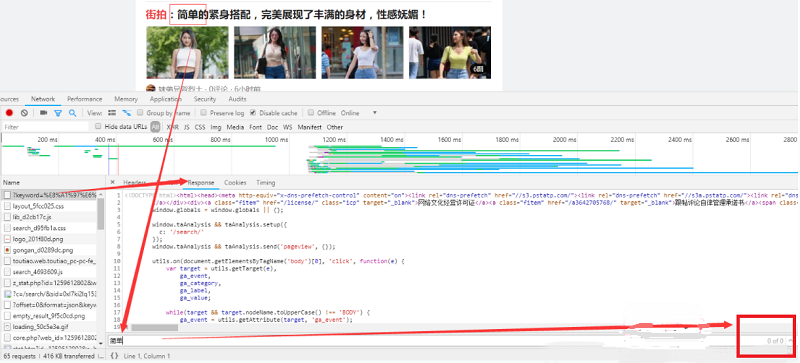
我们在搜索中并没有发现上面的文字,那么我们可以初步判定,这个由Ajax加载,然后渲染出来的。此时切换到xhr过滤,可以看到确实是ajax请求。
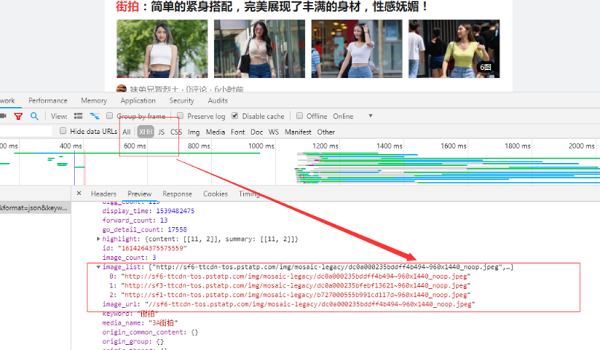
观察请求的特点,发现只有offset是改变的,而且一次加20,。
我们可以用它来控制数据分页,然后把图片下载下来。代码如下:
import requests
import os
from urllib.parse import urlencode
from hashlib import md5
from multiprocessing.pool import Pool
from requests import codes
def get_page(offset):
  params = {
    "offset":offset,
    "format":"json",
    "keyword":"街拍",
    "autoload":"true",
    "count":"20",
    "cur_tab":"1",
    "from":"search_tab"
  }
  url = 'https://www.toutiao.com/search_content/?'+urlencode(params)
  try:
    response = requests.get(url)
    if response.status_code == 200:
      # print(url)
      return response.json()
  except requests.ConnectionError:
    return None
# get_page(0)
def get_images(json):
  if json.get('data'):
    for item in json.get('data'):
      if item.get('cell_type') is not None:
        continue
      title = item.get('title')
      images = item.get('image_list')
      for image in images:
        yield {
          'title':title,
          'image':'https:' + image.get('url'),
        }
def save_image(item):
  #os.path.sep  路径分隔符‘//'
  img_path = 'img' + os.path.sep + item.get('title')
  if not os.path.exists(img_path):
    os.makedirs(img_path)
  try:
    resp = requests.get(item.get('image'))
    # print(type(resp))
    if codes.ok == resp.status_code:
      file_path = img_path + os.path.sep + '{file_name}.{file_suffix}'.format(
        file_name=md5(resp.content).hexdigest(),#md5是一种加密算法获取图片的二进制数据,以二进制形式写入文件
        file_suffix='jpg')
      if not os.path.exists(file_path):
        with open(file_path,'wb')as f:
          f.write(resp.content)
          print('Downladed image path is %s' % file_path)
      else:
        print('Already Downloaded',file_path)
  except requests.ConnectionError:
    print('Failed to Save Image,item %s' % item)
def main(offset):
  json = get_page(offset)
  for item in get_images(json):
    print(item)
    save_image(item)
GROUP = 0
GROUP_END = 2
if __name__ == '__main__':
  pool = Pool()
  groups = ([x*20 for x in range(GROUP,GROUP_END)])
  pool.map(main,groups)  #将groups一个个调出来传给main函数
  pool.close()
  pool.join()   #保证子进程结束后再向下执行 pool.join(1) 等待一秒
总结
以上就是这篇文章的全部内容了,希望本文的内容对大家的学习或者工作具有一定的参考学习价值,谢谢大家对脚本之家的支持。如果你想了解更多相关内容请查看下面相关链接
您可能感兴趣的文章:
- Ajax引擎 ajax请求步骤详细代码
- vue项目使用axios发送请求让ajax请求头部携带cookie的方法
- 为jquery的ajax请求添加超时timeout时间的操作方法
- 通过Ajax请求动态填充页面数据的实例
- ajax请求后台得到json数据后动态生成树形下拉框的方法
- 通过jquery的ajax请求本地的json文件方法
- jQuery中ajax请求后台返回json数据并渲染HTML的方法
- ajax请求后台接口数据与返回值处理js的实例讲解
- jquery 通过ajax请求获取后台数据显示在表格上的方法
- Python基于分析Ajax请求实现抓取今日头条街拍图集功能示例
- 关于Ajax异步请求后台数据进行动态分页功能